
Why don't I see the badges in the Taskbar Icon?
Check the Rambox and system settings that control the unread badge on Rambox's taskbar, Dock or tray icon.
Rambox can show a badge on its taskbar, Dock or tray icon when you have unread messages, so you know at a glance that something is waiting. If the badge doesn't show up, one of the settings below is usually the reason. Go through them in order.
1. The indicator is turned on in Settings
- Click your avatar at the bottom of the sidebar and choose Settings.
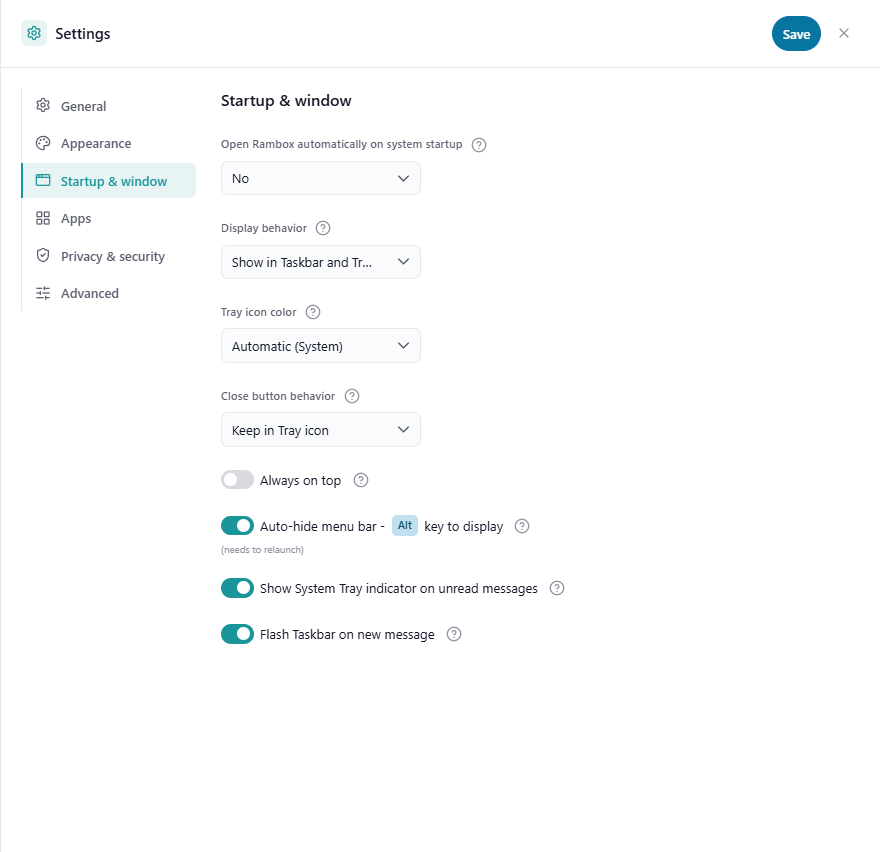
- Open the Startup & window tab.
- Make sure this option is on:
- Windows and Linux: Show System Tray indicator on unread messages
- macOS: Show Dock icon indicator on unread messages
- Click Save.
It's on by default.
2. The app counts toward the total
The badge on the Rambox icon adds up the unread counts of your apps, but only of the apps and workspaces that are set to be included.
For each app:
- Right-click the app in the sidebar and click the gear icon (Settings).
- In Unread counter, make sure Include in workspace is ticked. (Display in tab controls the badge on the app's own icon in the sidebar.)
- Click Save.
For each workspace:
- Right-click the workspace in the sidebar and click the gear icon (Settings).
- In Unread counter, make sure Include in global is ticked. (Display in Tab controls the badge on the workspace in the sidebar.)
- Click Save.

3. The app and its workspace are enabled
Disabled apps and workspaces don't load, so they can't report unread messages. Right-click the app or workspace and check that Enabled is on. See Apps and workspaces quick settings.
The same goes for hibernated apps: while asleep, they can't check for new messages. See How to hibernate.
4. Focus mode isn't hiding badges
If Settings → Apps → Remove all badges when 'Focus mode' is active is on, all badges disappear while Focus mode is running. Check the Concentration button in the title bar to see whether a focus session is active, or turn the setting off. See Focus mode, Pomodoro and ambient sounds.
5. Work hours
If the workspace has Work hours set, its badge in the sidebar is hidden outside those hours. See Work hours.
6. The app itself reports unread messages
Rambox reads the unread count that each service publishes. Some services only show a count for certain things (for example, direct messages but not channels), and some custom apps don't report one at all. See Adding custom apps for a workaround.
Still no badge? Check your system settings
Windows 11
Open Settings → Personalization → Taskbar → Taskbar behaviors and turn on Show badges on taskbar apps.
Windows 10
Right-click an empty area of the taskbar, choose Taskbar settings, and turn on Show badges on taskbar buttons.
macOS
Open System Settings → Notifications, click Rambox in the list, and turn on Badge application icon.
Linux
Whether a badge appears depends on your desktop environment and its tray or dock. Make sure your desktop shows tray icons (some, like GNOME, need an extension for it).