
How to Enroll for Rambox Beta Program?
Switch to the beta channel to try upcoming features and fixes before they're released, and how to go back to stable.
The beta program gives you early access to upcoming features and bug fixes before they're released to everyone. In exchange, you help us by reporting anything that doesn't work as expected.
WARNING
Beta versions are still being tested and may contain problems. If you rely on Rambox for critical work, consider staying on the stable channel.
Join the beta program (Windows and macOS)
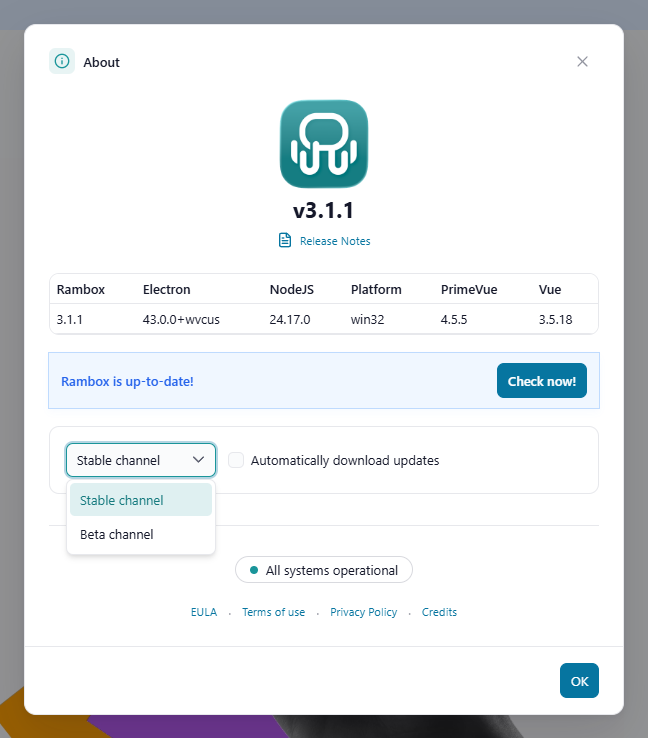
- Open the About Rambox window:
- Windows: click the Menu button at the top-left of the window, then Help → About Rambox.
- macOS: in the menu bar, choose Rambox → About Rambox.
- Change Stable channel to Beta channel.
- Click Check now! to see whether a beta version is available.
- If there is one, it downloads like any other update. Restart Rambox when it's ready to install it.
While you're on a beta version, Rambox shows a reminder: "You are running a beta version and it may contain some problems still. If you come across any, please report it."
Join the beta program (Linux)
Rambox doesn't update itself on Linux, so betas are installed by hand:
- Go to the Rambox releases page on GitHub.
- Find the latest release marked Pre-release.
- Download the package for your system (AppImage, DEB, RPM, Snap, Flatpak, tar.gz or zip) and install it.
Leave the beta program
- Open About Rambox again.
- Change Beta channel back to Stable channel.
- Click Check now!.
Rambox then installs the latest stable version, even if it's older than the beta you were using.
On Linux, download and install the latest stable release from rambox.app or the releases page.
Good to know
- If you install a beta version by hand, Rambox switches to the beta channel automatically.
- Company (Enterprise) accounts always stay on the stable channel. The channel selector isn't shown to members of an organization.
Report a problem in a beta
Found something wrong? Send us a support request and mention the beta version you're using (you'll find it in the About Rambox window). A short description of the steps to reproduce the problem, and a screenshot, help a lot.