
How to customize apps using Stylish
Apply a ready-made user style (a theme made by the community) to any app in Rambox, or paste its CSS yourself.
Pro feature
Stylish URL is available on the Pro plan and during the free trial. On Basic the field is visible but disabled. How to become Pro
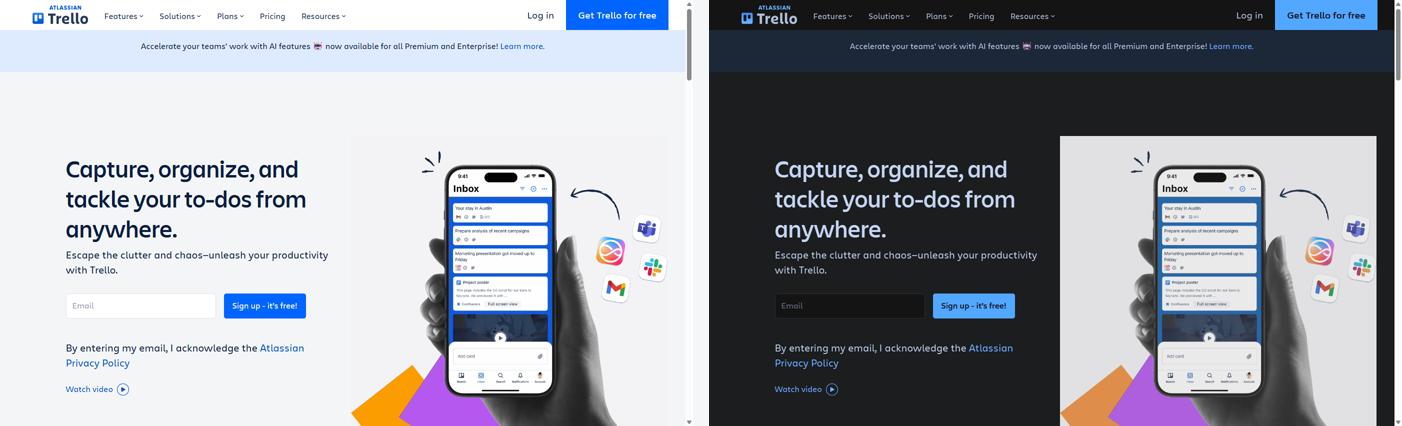
User styles are themes made by the community that change how a website looks: a dark mode for an app that doesn't have one, a more compact layout, different colors. Rambox can download a user style from its address and apply it to an app with the Stylish URL option.
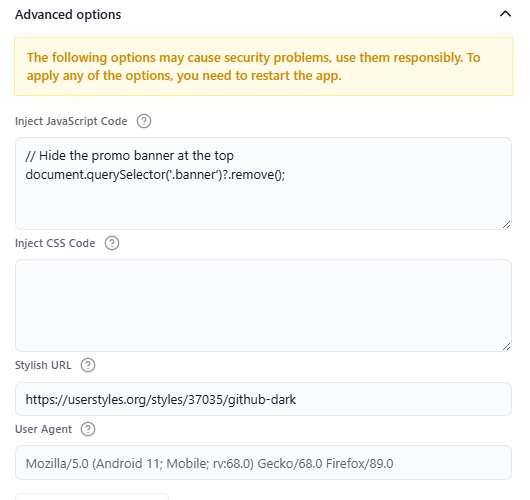
Apply a style with Stylish URL
- Find the style you want on userstyles.org and open its page.
- Copy the address of the style's page from your browser. It looks like
https://userstyles.org/styles/123456/style-name. - In Rambox, right-click the app in the sidebar and click the gear icon (Settings).
- Scroll down and open Advanced options.
- Paste the address into Stylish URL.
- Click Save, and confirm the Warning dialog so Rambox reloads the app.
The style is applied every time the app loads.
To remove the style, empty the Stylish URL field and click Save.
If the style doesn't load
If Rambox can't download the style after several tries, it shows Error trying to load Stylish for {app}. Skipping... and the app loads without it. Check that:
- the address is the style's own page on userstyles.org, copied in full;
- the style still exists (open the address in your browser);
- you're connected to the internet.
Use a style from another site
The Stylish URL field works with addresses from userstyles.org. If you found a style on a different site, or you want to tweak it, copy the style's CSS code instead:
- On the style's page, find the CSS code (often under a "Source" or "Code" link) and copy it.
- In the app's settings, open Advanced options and paste it into Inject CSS Code.
- Click Save and confirm the reload.
Learn more in How to inject JavaScript and CSS code.
Tips
- A style is written for a specific website. Use one made for the same service as your app (for example, a WhatsApp Web style for your WhatsApp app).
- When the service changes its design, the style may stop working until its author updates it.
- Rather than a style per app, you might prefer the Dark Reader or Dark Mode extensions, which darken almost any app. See Extensions.
If you move to the Basic plan
The address stays saved in the app's settings, but Rambox stops applying the style while you're on Basic. It comes back when you upgrade.