
Subscription cancellation
Cancel your Rambox Pro subscription from the Billing page. You keep Pro until the end of the period you paid for, then move to Basic.
You can cancel your Pro subscription at any time from the Billing page of the Rambox Console. Cancelling stops future renewals: you keep Pro until the end of the period you have already paid for, and then your account moves to the free Basic plan.
Cancel your subscription
In the Rambox app, click your profile picture at the bottom of the sidebar and choose Billing.
The Billing page of the Rambox Console opens in your browser. You can also go to console.rambox.app/billing and sign in.
In the Subscription card, click Cancel subscription.
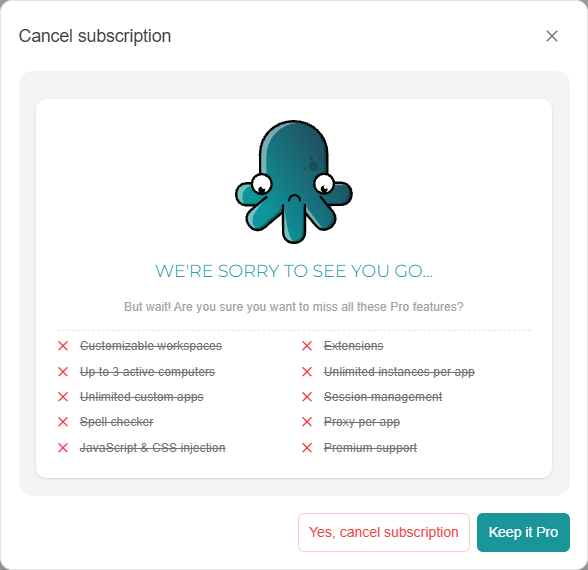
The Cancel subscription dialog lists the Pro features you will lose. Click Yes, cancel subscription. (To change your mind, click Keep it Pro.)
Confirm with Cancel subscription ("Cancel your subscription at the end of the current period?").
You are taken to Stripe's secure page. Confirm the cancellation there.
Back on the Billing page, the Subscription card shows a Cancels at period end tag.
What happens next
- Until the end of the paid period you keep every Pro feature. The date is shown under Renews / expires in the Plan card.
- When the period ends your account moves to the free Basic plan and you are not charged again. The Rambox app asks you to choose the one workspace you keep on Basic. Nothing is deleted. See Where do my apps and workspaces go after changing to Basic?
Cancelling doesn't refund the current period. If you think you are entitled to a refund, see Refunds.
Changed your mind?
Before the period ends: go back to Billing and click Resume in the Subscription card. You will see "Subscription resumed", and your subscription renews as usual.
After the period ends: subscribe again with Upgrade to Pro. See How to become Pro. Your locked workspaces are unlocked again.
Lifetime licenses and trials
- A Lifetime license has no renewals, so there is nothing to cancel.
- A free trial never charges you. See How can I cancel my trial period?
Enterprise subscriptions
Organization owners and admins cancel their organization's subscription from the Console's Billing page too. See Subscribing to Rambox Enterprise.
You can read the full cancellation policy in our Terms of Use.
If you have any questions, contact support.