
How to change my email for Rambox
Change the email address you use to sign in to a personal Rambox account from the Rambox Console, confirming it with a code.
You can change the email address of your personal Rambox account yourself, from the Profile page of the Rambox Console. Your apps, workspaces, settings, plan and billing details all move to the new address.
Enterprise members
If your account belongs to a company's Rambox Enterprise organization, you can't change its email. Ask your organization's administrator.
Before you start
- You need access to the new email address: a 6-digit confirmation code is sent there.
- The new address can't already have a Rambox account. If it does, you will see "An account with this email already exists."
- When the change is done, every computer where you use Rambox is signed out, and you sign in again with the new address.
Change your email
In the Rambox app, click your profile picture at the bottom of the sidebar and choose Profile.
The Profile page of the Rambox Console opens in your browser. You can also go to console.rambox.app, sign in and open Profile.
In the Change email card, click Change email.
Type your New email and click Continue.
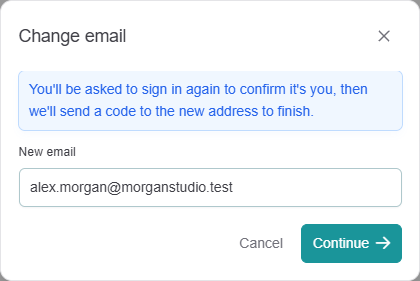
To confirm it's you, Rambox sends you to the sign-in page ("Confirming your identity — redirecting you to sign in…"). Click Go now if you don't want to wait, and sign in with your current email.
You see "Check your email". Open the email Rambox sent to your new address.
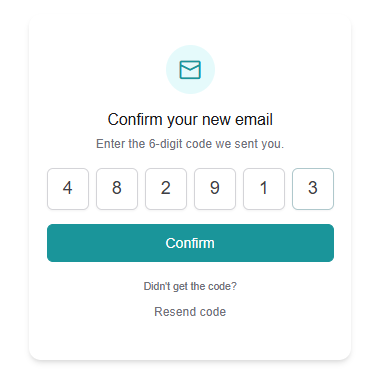
On the Confirm your new email page, enter the 6-digit code and click Confirm.
You see Email changed. Click Go to sign in and sign in with your new email.
The code is valid for 30 minutes.
Didn't get the code?
- Check your spam or promotions folder in the new mailbox. The code is never sent to your old address.
- On the confirmation page, click Didn't get the code? and then Resend code. You can ask for a new code every 30 seconds.
- If you see "This link has expired", start again from step 2.
- If you see "Incorrect code — check the email and try again.", check that you typed the latest code you received.
See also Not receiving emails from Rambox.
After the change
- Your Rambox apps show an "Email change" message and sign you out. Sign in again with your new email. See Signing in to Rambox.
- If you signed in with Google or Facebook before, check Sign-in & security on your Profile page to see which sign-in methods are still connected.
- Your plan, subscription and invoices stay with your account under the new address.