
How to redeem a coupon
Apply a Rambox coupon code in the plan dialog of the Rambox Console before you go to checkout.
If you have a Rambox coupon code, you enter it in Rambox's own plan dialog, before you go to the payment page. The Stripe checkout page has no coupon box, so don't wait until you get there.
Apply a coupon
In the Rambox app, click your profile picture at the bottom of the sidebar and choose Change plan (on Basic) or Billing.
The Billing page of the Rambox Console opens in your browser. You can also go to console.rambox.app/billing and sign in.
In the Subscription card, click Upgrade to Pro (or Change plan if you already pay for Pro).
Choose Monthly, Yearly or Lifetime.
In the Order summary, type your code in Have a coupon code?.
Click the arrow button (Apply coupon) or press Enter.
You will see "Coupon successfully applied". The discount appears in the Order summary and the Total is updated.
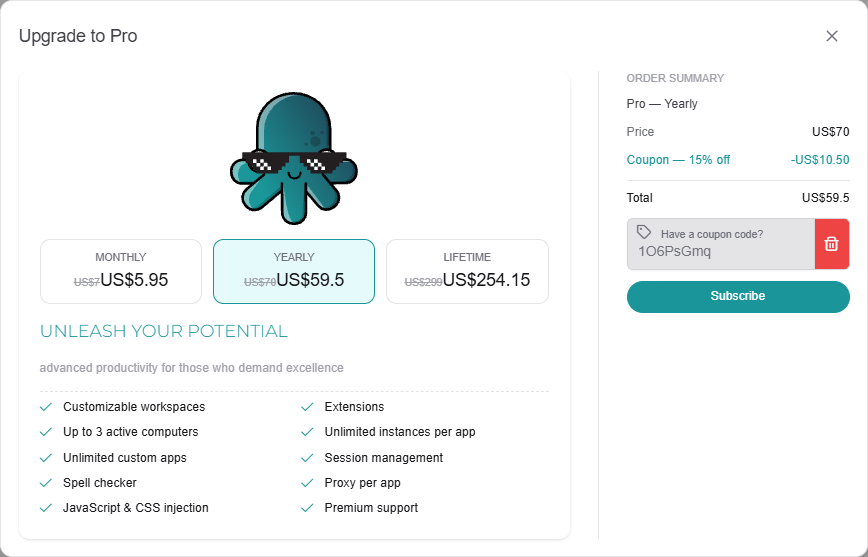
Click Subscribe (or Change plan) and complete the payment on Stripe's page.
To remove a coupon you applied, click the trash icon next to it.
Coupons for one billing cycle only
Some coupons are valid only for one option, for example only for Monthly. When you apply one of them:
- The options it doesn't cover are greyed out.
- A note says "The applied coupon is only valid for the Monthly plan." (or the cycle it applies to).
If you select an option the coupon doesn't cover, you will see "This coupon doesn't apply to the selected plan."
If the coupon doesn't work
When a code can't be used, you will see "Coupon not valid" (or a message explaining why). Check that:
- you typed the code exactly as you received it;
- the coupon hasn't expired;
- the coupon is meant for the plan you chose.
If it still doesn't work, contact support and include the code.
Promotions
When Rambox runs a promotion, you don't need a code: the discount is applied automatically, and the original price is shown crossed out.