
How to remove your account
Permanently delete your Rambox account, its apps, workspaces and settings from the Rambox Console. Any subscription ends immediately.
You can delete your Rambox account yourself at any time, from the Profile page of the Rambox Console. Deleting is permanent: there is no way to recover the account or anything in it afterward.
Read this before deleting
Deleting your account:
- Ends any paid subscription immediately, even if you have paid time left. That time is not refunded, and the confirmation dialog doesn't warn you about it.
- Deletes your sign-in account, all your apps, workspaces and settings, and your billing details.
- Can't be undone. No confirmation email is sent.
If you only want to stop paying, cancel your subscription instead: you keep Pro until the end of the period you paid for, and your account stays on the free Basic plan. If you think you are entitled to a refund, ask for it before deleting your account.
Delete your account
In the Rambox app, click your profile picture at the bottom of the sidebar and choose Profile.
The Profile page of the Rambox Console opens in your browser. You can also go to console.rambox.app, sign in and open Profile.
Scroll down to the Delete account card ("Permanently delete your account and all associated data. This can't be undone.") and click Delete account.
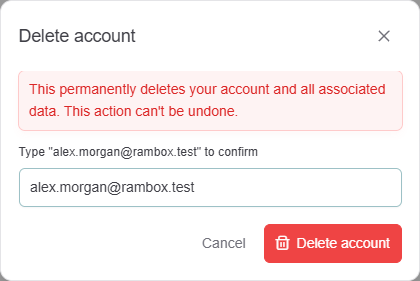
In the Delete account dialog, type your account email exactly as shown (
Type "you@example.com" to confirm).Click Delete account.
You are signed out and see "Your account has been deleted."
What happens to the Rambox app
Rambox on your computers can no longer use the deleted account. You can uninstall it (How to uninstall Rambox) or sign in with another account.
If you sign up again later
You can create a new account with the same email address in the future. It starts empty. If your previous account was on the free Basic plan, the new one starts on Basic too, instead of getting a new free trial.
Enterprise members
If your account belongs to a company's Rambox Enterprise organization, ask your organization's administrator to remove you from it.
Prefer that we do it?
You can also ask our support team to delete your account: see Request support. We would also love to hear why you are leaving, or about any problem we could help with.