
How can I cancel my trial period?
Your Rambox Pro trial needs no card and ends in the free Basic plan by itself. You can also switch to Basic earlier from the Billing page.
Every new Rambox account starts with a free Pro trial. You don't enter a card to start it, so you will never be charged for it and there is nothing you need to cancel. When the trial ends, your account moves to the free Basic plan automatically.
What happens when the trial ends
- Your account switches to the Basic plan by itself.
- The Rambox app shows the message "Your trial or subscription has ended" and lists what Basic doesn't include.
- If you have more than one workspace, you choose the one you want to keep using on Basic. The others are locked, not deleted. See Where do my apps and workspaces go after changing to Basic?
You can see how many days you have left in the Rambox app: click your profile picture at the bottom of the sidebar and look for {days} trial days left (for example "5 trial days left").
Switch to Basic before the trial ends
If you prefer to stop the trial now:
In the Rambox app, click your profile picture at the bottom of the sidebar and choose {days} trial days left (or Billing).
The Billing page of the Rambox Console opens in your browser. You can also go to console.rambox.app/billing and sign in.
In the Subscription card, click Downgrade to Basic.
The dialog lists the Pro features you will lose. Click Yes, downgrade to basic.
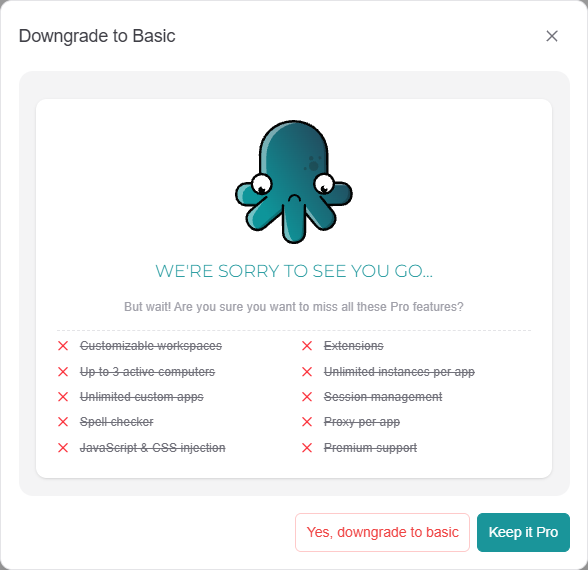
Confirm with Downgrade ("Downgrade to the free Basic plan?").
The change is immediate. You will see "Switched to the Basic plan", and the trial days you had left are lost.
WARNING
Downgrading ends the trial for good. If you want to keep trying Pro, simply let the trial run out instead: the result is the same, without losing the remaining days.
Want to keep Pro instead?
Click Upgrade to Pro on the same page at any time during the trial. See How to become Pro.