
How to change your Pro plan
Switch your Pro subscription between monthly, yearly and lifetime from the Billing page of the Rambox Console. Unused time is credited.
If you already pay for Pro, you can switch between the Monthly, Yearly and Lifetime options at any time. The time you have already paid for and not used is credited toward the new plan.
Change your plan
In the Rambox app, click your profile picture at the bottom of the sidebar and choose Billing.
The Billing page of the Rambox Console opens in your browser. You can also go to console.rambox.app/billing and sign in.
In the Subscription card, click Change plan.
In the Change plan dialog, your current option has a Current tag. Click the option you want instead.
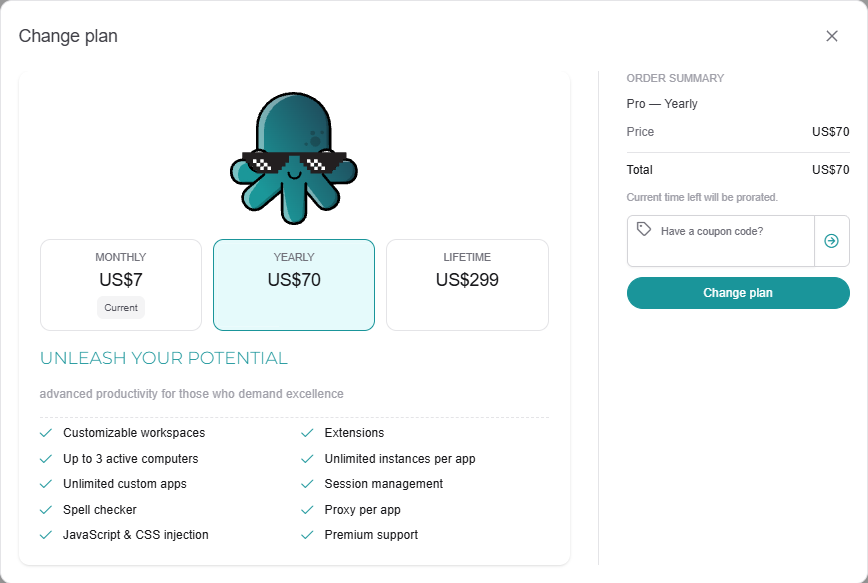
Check the Order summary. The note "Current time left will be prorated." means the unused part of your current period is taken into account.
Click Change plan.
Confirm the change on Stripe's secure page.
You return to the Console's Billing page, which now shows your new billing cycle.
Monthly ↔ yearly
Switching between monthly and yearly keeps your subscription and changes how often you pay. Stripe shows you the amount before you confirm, already adjusted for the time you have left.
Moving to Lifetime
Lifetime is a one-time payment, so you go through a regular checkout. The checkout shows a credit for the unused time of your current subscription ("Credit applied for unused subscription time"). After you pay, your monthly or yearly subscription is cancelled automatically, so you are not charged again.
INFO
A Lifetime license can't be switched to monthly or yearly: it has no renewals, so there is nothing to change. That is also why the Subscription card isn't shown on the Billing page for Lifetime users.
Using a coupon when you change plan
You can enter a coupon in Have a coupon code? in the same dialog. Some coupons only work for one billing cycle: the other options are greyed out and a note says which one the coupon is valid for. See How to redeem a coupon.
Still on the free trial?
The Change plan button appears once you have a paid subscription. During the trial, use Upgrade to Pro instead. See How to become Pro.