
Why are popups blocked?
Why Rambox blocks pop-ups by default and how to allow them.
Sometimes, when clicking on a link that should open a popup window, you might see this message:

This is because we block these popups by default to provide a better navigation experience and prevent unnecessary external windows. If you want to enable them when clicking on links for some apps, please follow these steps:
Right click on the app's icon (follow Apps and Workspaces quick settings).
Select "Settings".
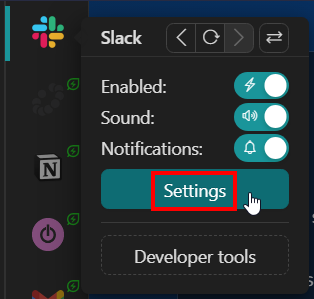
A drawer will open and you will see a field called "Link handling".
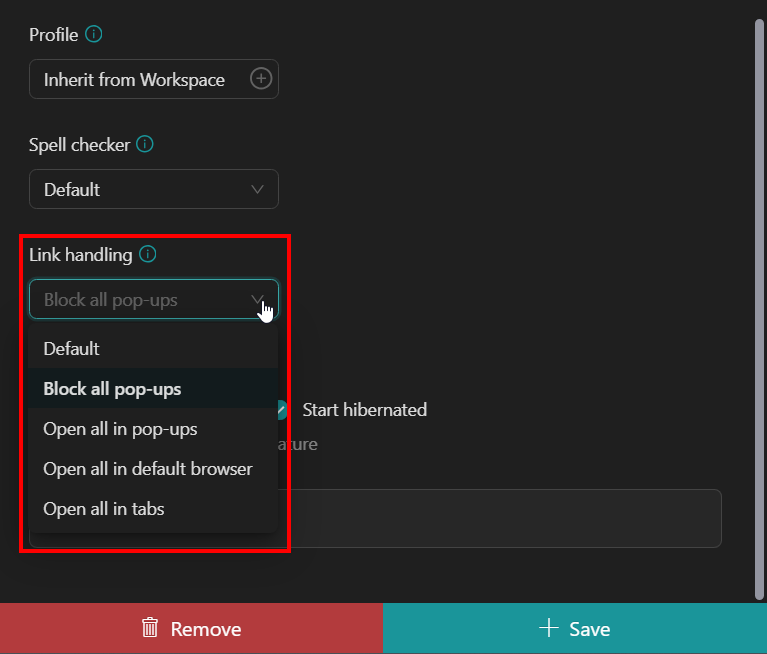
Choose the link handling option you prefer:
Default: open links with the default option set in our General Settings. Block all pop-ups: prevent all pop-ups from showing. Open all in pop-ups: open links in a new Rambox window. Open all in default browser: open links in your default browser. Open all in tabs: open links in a "temporary" tab.
Lastly, click "Save" at the bottom-right.