
How to edit a user?
Change a user's team, workspace and permissions from the Web Admin.
Following these steps, you will be able to modify a user's Team, Workspace, and Permissions, among others:
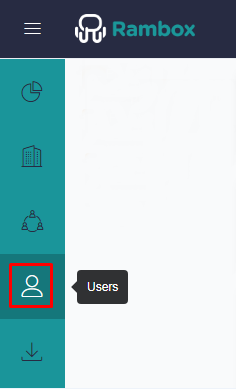
First, go to the "Users" section of the Admin.
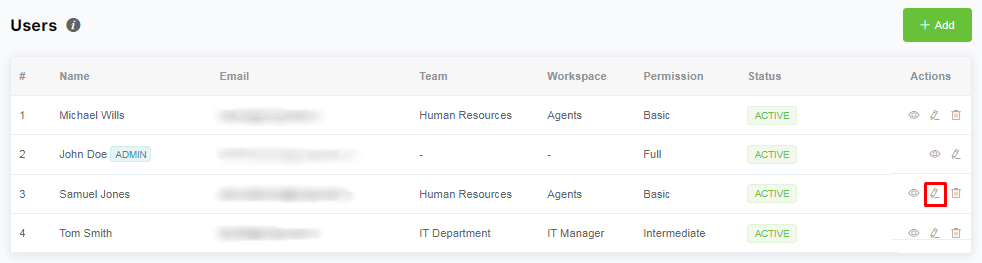
Click on the pencil button of the user to edit it. Then, a drawer will open.
Here you can change all the properties of the user. Once that's done, click on the "Save" button.
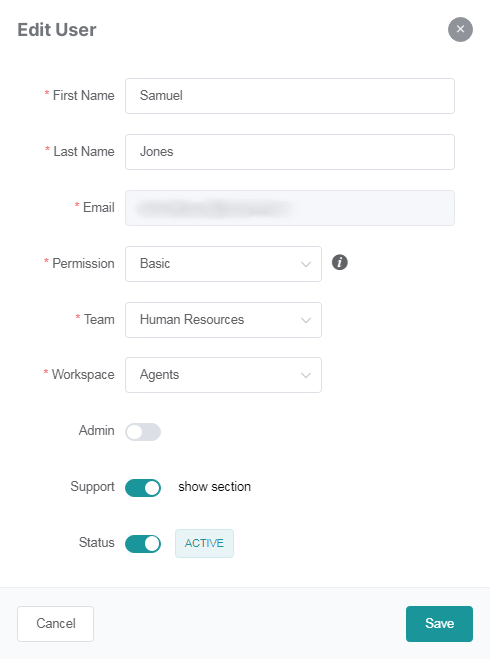
First name: The name of the user.
Last name: The surname of the user.
Email: User's email.
Permission: Here, we offer three options:
Basic: The user will only have access to the apps and groups pre-assigned to his team and workspace.
Intermediate: They have the team's pre-assigned workspace, but also have the ability to add their own groups and apps.
Full: The user doesn't have a pre-assigned team nor a workspace. They can manage their workplace by adding groups and apps freely.
Admin: Determines if the recipient of the invite will have access to the Admin.
Support: Determines if the "Support" section of Rambox will be shown in the user's desktop app.