
Problems with payment?
Solve errors when paying for Rambox Pro with a credit or debit card, and update your payment method on the Billing page.
Rambox uses Stripe to process payments securely. If your payment for a new subscription, a plan change or a renewal didn't go through, this article helps you find out why.
Likely causes
- Your card was declined by your bank (expired card, insufficient funds, online or international payments blocked, or a security check).
- The card details or billing address don't match what your bank has.
- A temporary problem with the payment service or your connection.
How to fix it
1. Wait a moment and try again
Temporary errors often go away on their own. Wait a few minutes and try the payment again.
2. Check with your bank
Make sure the card is active, has enough funds and allows online and international payments. Some banks ask you to approve the payment in their app, or block it until you confirm it was you.
3. Update your payment method
Your billing lives in your Rambox account on the web, not inside the desktop app.
- In Rambox, click your avatar at the bottom of the sidebar and choose Billing (or Change plan). The Billing page opens in your web browser, already signed in. You can also go to console.rambox.app/billing.
- Under Payment methods, click Add. Stripe's secure page opens: enter the new card.
- Click the star icon (Make default) on the card you want to use.
- If needed, update your name, address or tax ID under Billing information → Update.
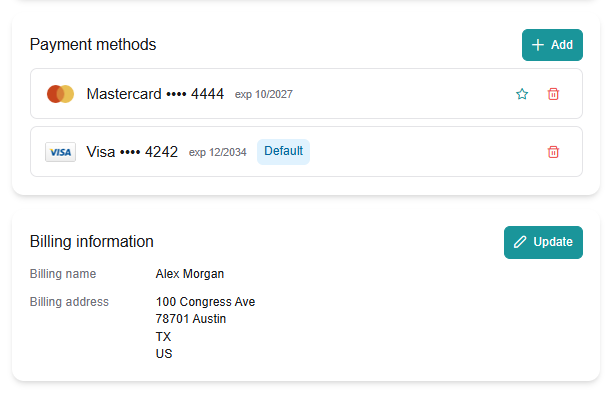
You can't remove your only card while you have an active subscription. Add the new one first, make it the default, then remove the old one.
More about the Billing page: Billing section and payment information.
4. Coupon not accepted?
Coupons are entered in Rambox's plan dialog (Have a coupon code?), not on Stripe's payment page. Some coupons only apply to one plan (Monthly, Yearly or Lifetime). See How to redeem a coupon.
Your renewal failed
If a renewal fails, Rambox shows Payment failed: We were unable to renew your license and we retry the payment over the next few days. You keep Pro while we retry. See License expired?
Don't dispute the charge with your bank
If you think you were charged by mistake, contact us first. Opening a dispute or chargeback with your bank can block your Rambox account. We'll help you sort it out, including refunds where they apply. See Refunds.
When you open a support ticket about a payment, choose Billing as its topic so it reaches the right team.
Related articles
Still not working? Request support